
Some people think better when everything outside the current thought disappears — no scrolling, no surrounding context competing for attention, just a bullet and its children. Apps like Roam, Logseq, and RemNote are built around this style of thinking, and if you’ve used any of them you know how it feels. Obsidian doesn’t work that way out of the box, but two plugins and a CSS snippet get you close enough that you stop noticing the difference.
What Is Bullet Journaling?
Bullet journaling was created by Ryder Carroll1 as an analog system for capturing tasks, notes, and reflections using a rapid logging syntax — every entry is a bullet, categorized by a symbol, fast to write and easy to scan. What made it resonate wasn’t the notebook or the symbols, it was the underlying idea: a single place where your thoughts live in a structured, navigable form. Carroll built it partly to manage his own ADHD2, and that origin shows — it’s designed to reduce friction between having a thought and capturing it.
When people moved this to digital tools, the ones that felt most natural were the ones that kept the bullet as the primary unit of thought. Not pages, not documents — bullets you can nest, fold, and zoom into. That’s what Roam, Logseq, and RemNote are built around, and it’s what this setup brings to Obsidian.
Essential Plugins
To get there, you need two plugins: Outliner and Zoom.
Outliner is the foundation — it makes lists behave like an actual outline rather than decorated text. Items move, indent, fold, and each bullet is treated as its own node. That last part is what Zoom needs to work, so install Outliner first even if it feels like a background plugin.
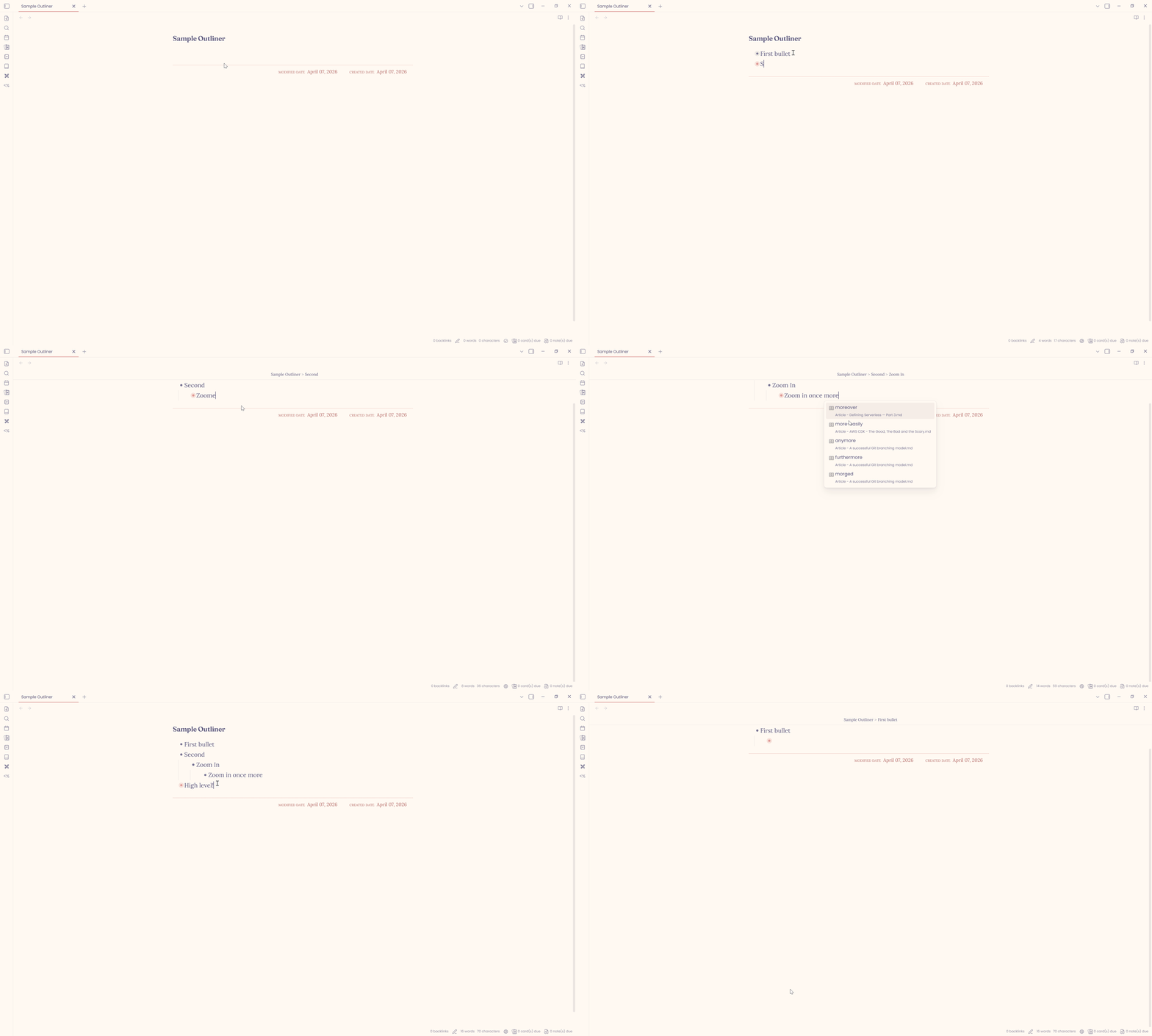
Once Outliner is in place, Zoom is what makes the experience click. Click any bullet and everything outside it disappears — just that thought and whatever lives under it. A breadcrumb at the top keeps you oriented, and clicking it steps you back out. It works on headings too, with Ctrl+. on Windows/Linux or Cmd+. on macOS.
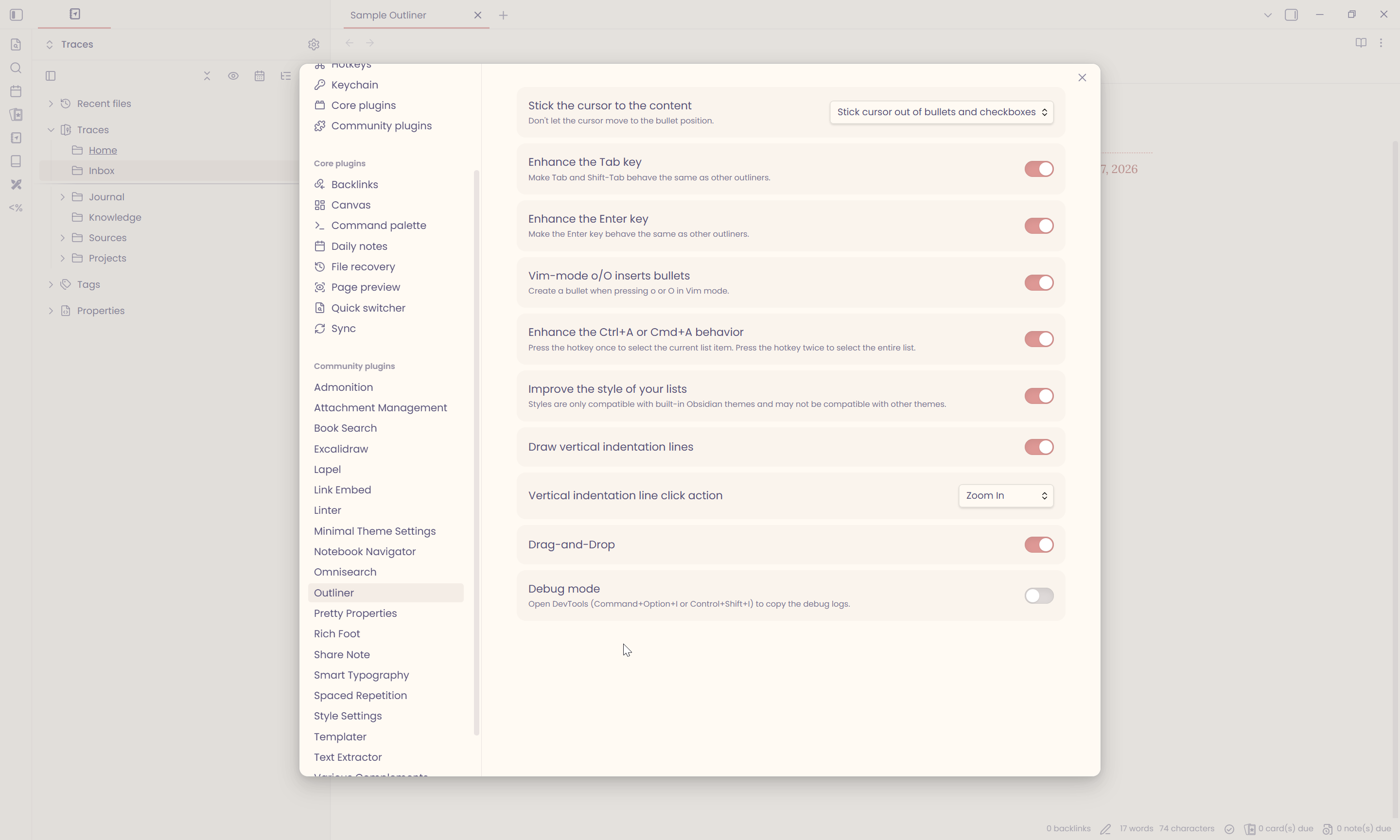
Install both from Settings → Community Plugins → Browse. Here’s how I have Outliner configured — most of it is personal preference, but it’s a useful starting point:
Styling the Bullets
The plugins handle the behavior, but the default Obsidian bullet is a plain dot that gives you no visual feedback at all. If you’re navigating a deep outline, that friction adds up. This CSS snippet makes the bullets respond — a ghost ring appears on hover, and whichever bullet is active lights up in your accent color. Small change, but it makes the whole thing feel intentional.
Save it as rem-bullets.css in your snippets folder (Settings → Appearance → CSS Snippets → Open snippets folder), then enable it from the same panel:
.cm-s-obsidian .list-bullet::after {
    content: '';
    width: 7px;
    height: 7px;
    border-radius: 50%;
    background-color: var(--text-muted);
    position: relative;
    z-index: 1;
    box-shadow: none;
    transition: background-color 0.15s ease, box-shadow 0.15s ease;
}

/* Ghost ring — editor mode */
.cm-s-obsidian .HyperMD-list-line:hover .list-bullet::after {
    box-shadow: 0 0 0 5px rgba(128, 128, 128, 0.15);
}

/* Ghost ring — reading mode */
.markdown-preview-view ul li:hover>.list-bullet::after,
.markdown-reading-view ul li:hover>.list-bullet::after {
    box-shadow: 0 0 0 5px rgba(128, 128, 128, 0.15);
}

/* Active — Outliner selected */
.cm-s-obsidian .outliner-plugin-list-item--selected .list-bullet::after {
    background-color: var(--interactive-accent);
    box-shadow: 0 0 0 5px color-mix(in srgb, var(--interactive-accent) 25%, transparent);
}

/* Active via :active on click */
.cm-s-obsidian .HyperMD-list-line:active .list-bullet::after {
    background-color: var(--interactive-accent);
    box-shadow: 0 0 0 5px color-mix(in srgb, var(--interactive-accent) 25%, transparent);
}

/* Active via Outliner's cursor line class */
.cm-s-obsidian .HyperMD-list-line.cm-active .list-bullet::after {
    background-color: var(--interactive-accent);
    box-shadow: 0 0 0 5px color-mix(in srgb, var(--interactive-accent) 25%, transparent);
}
The snippet is also available as a Gist. Enable it from the CSS Snippets panel.
What’s Missing
This setup won’t give you block references — the ability to embed a specific bullet inside another note and have both stay in sync. That’s something Roam is built around at a fundamental level, and it doesn’t translate to a file-based system like Obsidian. Strange New Worlds can surface how many times something is referenced, but that’s a different thing entirely.
If block references are central to how you think, Logseq is probably the honest answer — it’s built around that model and the files are still plain text. But if what you were missing was just the focus and the outliner feel, this is it.
My full Obsidian setup is in the Obsidian setup post.
-
Ryder Carroll — The Bullet Journal Method. Carroll launched the system in 2013 as a flexible analog framework for organizing tasks, notes, and reflections. ↩
-
Carroll, R. — How ADHD Helped Me Create the Bullet Journal Method. Medium / Human Parts. Carroll’s own account of why he built the system and the role his diagnosis played in shaping it. ↩