Async vs Parallel in C#: I/O-Bound vs CPU-Bound Work
Two Different Answers to Two Different Problems
In the previous part, we saw how async/await turns thread-blocking into thread-freeing during I/O. But async programming is only part of the picture. Sometimes the bottleneck isn’t waiting - it’s the work itself: heavy computation that keeps the CPU genuinely occupied.
These two cases call for fundamentally different solutions. Mixing them up - treating async as a universal performance fix, or wrapping synchronous I/O in Task.Run when a true async API exists - is one of the most common performance mistakes in .NET.
The kitchen metaphor still holds. Asynchrony is about timing: the cook steps aside while the oven works. Parallelism is about teamwork: several cooks work simultaneously to divide a large task. Both improve throughput. Neither replaces the other.
I/O-Bound vs. CPU-Bound: The Essential Distinction
The nature of the work determines which tool applies.
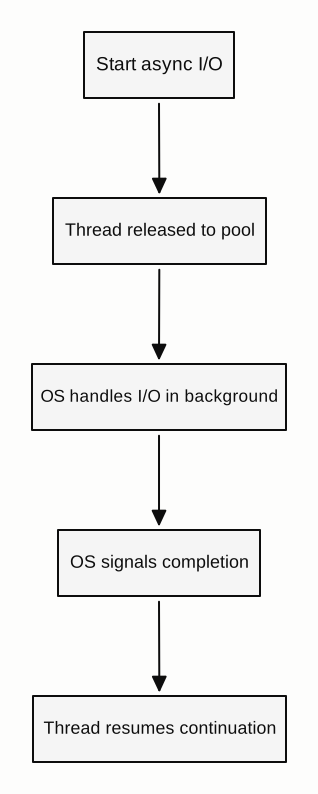
I/O-bound operations spend most of their time waiting for something external: a network socket to return data, a disk read to complete, a database query to execute. The CPU is idle during the wait. The problem isn’t compute capacity - it’s patience. Async/await handles this by releasing the thread during the wait and resuming when the signal arrives. No extra threads are created during the I/O.
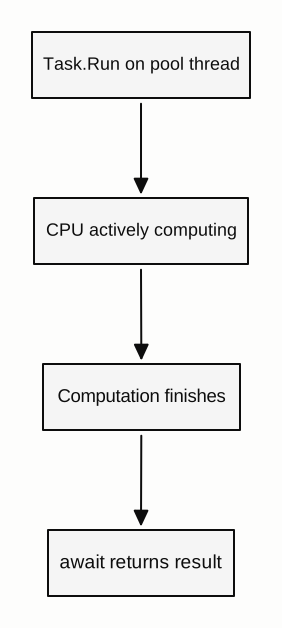
CPU-bound operations keep the processor genuinely busy: sorting large datasets, compressing images, running numerical simulations, rendering video frames. The CPU is the bottleneck. Releasing a thread doesn’t help - the work requires a CPU. What helps is distributing that work across multiple cores.
// I/O-bound: no thread held during the network wait
using var http = new HttpClient();
var json = await http.GetStringAsync("https://api.example.com/data");

// CPU-bound: divides heavy work across available cores
Parallel.For(0, inputData.Length, i =>
{
    results[i] = ComputeHeavy(inputData[i]);
});
Microsoft’s guidance on this distinction is explicit:
- I/O-bound: use
async/awaitwithoutTask.Run. The OS handles the wait; no thread is needed. - CPU-bound: use
async/awaitwithTask.Runto offload the computation to a thread-pool thread. (Microsoft Learn - Async scenarios)
I/O-Bound — thread released while waiting:
CPU-Bound — thread actively computing:
The rule of thumb
Ask yourself: is your code waiting for something external, or is it doing something itself?
Waiting for a server, a file, a database - reach for async/await. Transforming data, encoding media, running algorithms - reach for Parallel.For, PLINQ, or Task.Run.
Using Task.Run for CPU-Bound Work
Task.Run offloads a delegate to the thread pool. It’s the right tool when you have CPU-bound work that would otherwise occupy the calling thread - typically to keep a UI handler responsive while computation proceeds on a background thread.
// In a UI app: keep the button click handler responsive
private async void ProcessButton_Click(object sender, EventArgs e)
{
    this.StatusLabel.Text = "Processing...";
    var result = await Task.Run(() => HeavyTransform(inputData));
    this.ResultLabel.Text = result.ToString();
}
Task.Run moves HeavyTransform to a thread-pool thread. The UI thread is freed during the computation. When processing completes, the await resumes on the UI thread (because the UI SynchronizationContext was captured), so updating the labels is safe.
Don’t use Task.Run to wrap I/O
This is worth emphasizing because it’s a persistent mistake:
// Wrong: a thread-pool thread blocks waiting for disk I/O
var text = await Task.Run(() => File.ReadAllText(path));

// Right: OS-level async I/O - no thread held during the read
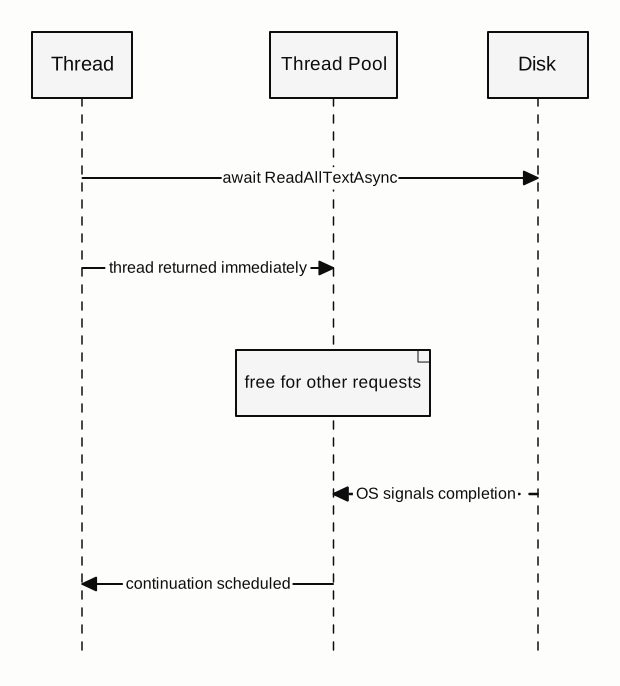
var text = await File.ReadAllTextAsync(path);
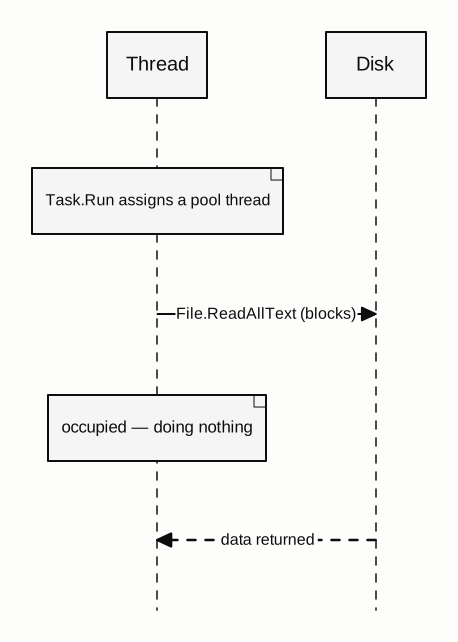
Task.Run(() => File.ReadAllText(path)) doesn’t use async I/O. It occupies a thread-pool thread while waiting for the disk - trading one blocked thread for another, with added scheduling overhead. Use the async version of the API instead. The same applies to database calls, HTTP requests, and any other I/O: prefer the framework’s own async APIs over wrapping sync calls in Task.Run.
Task.Run wrapping sync I/O — thread still blocked:
True async I/O — no thread held during the wait:
Composing Async and Parallel Work
Real systems often need both. A web API might fetch data concurrently from multiple services, then process the combined result in parallel before returning the response.
// Step 1: Fetch concurrently (async I/O - no extra threads during the waits)
var usersTask   = _userService.GetAllAsync(cancellationToken);
var ordersTask  = _orderService.GetAllAsync(cancellationToken);
var catalogTask = _catalogService.GetAllAsync(cancellationToken);

await Task.WhenAll(usersTask, ordersTask, catalogTask);

var users   = usersTask.Result;   // safe - task is complete
var orders  = ordersTask.Result;
var catalog = catalogTask.Result;

// Step 2: Enrich in parallel (CPU-bound - spread across cores)
var enriched = await Task.Run(() =>
    users.AsParallel()
         .Select(u => EnrichWithOrders(u, orders, catalog))
         .ToList());
Task.WhenAll composes concurrent I/O without creating any extra threads - it’s purely scheduling multiple completions. Task.Run then creates actual OS-level thread-pool work for the CPU-heavy enrichment step. Both improve throughput, but through entirely different mechanisms. Using Task.WhenAll for CPU work won’t parallelize it. Using Task.Run for I/O won’t free threads. They’re not interchangeable.
Parallel.For and PLINQ for Data-Parallel Work
For workloads where you apply the same operation to a large collection, the Task Parallel Library’s Parallel.For, Parallel.ForEach, and PLINQ (AsParallel()) divide that work automatically across the thread pool.
// Process each image across available cores
Parallel.ForEach(images, image =>
{
    ProcessImage(image);  // runs on multiple threads concurrently
});

// PLINQ: parallel LINQ for data transformation pipelines
var results = rawData
    .AsParallel()
    .Where(x => x.IsValid)
    .Select(x => Transform(x))
    .ToList();
These aren’t async - they block synchronously until all work finishes. That’s appropriate for CPU-heavy batch work, where you want to occupy the CPU fully and return a result when it’s done.
Choosing the Right Tool
| Work type | Bottleneck | Right approach |
|---|---|---|
| Network call | External signal (I/O) | async/await with async HTTP API |
| Database query | External resource (I/O) | async/await with async ADO/EF API |
| File read or write | Disk I/O | async/await with async File APIs |
| Image processing | CPU | Parallel.ForEach, PLINQ |
| Data transformation | CPU | Parallel.ForEach, PLINQ |
| CPU work on UI thread | CPU + thread protection | await Task.Run(...) |
| Multiple concurrent I/O calls | Scheduling | Task.WhenAll |
Knowing which category your work falls into is the first decision. Async frees threads from waiting. Parallel divides work across cores. Use each where it fits - and when a task is large enough, combine them deliberately.
In the next part, we’ll look at what happens when the wait ends: how the state machine picks up, which thread it resumes on, and what ConfigureAwait(false) actually controls in practice.